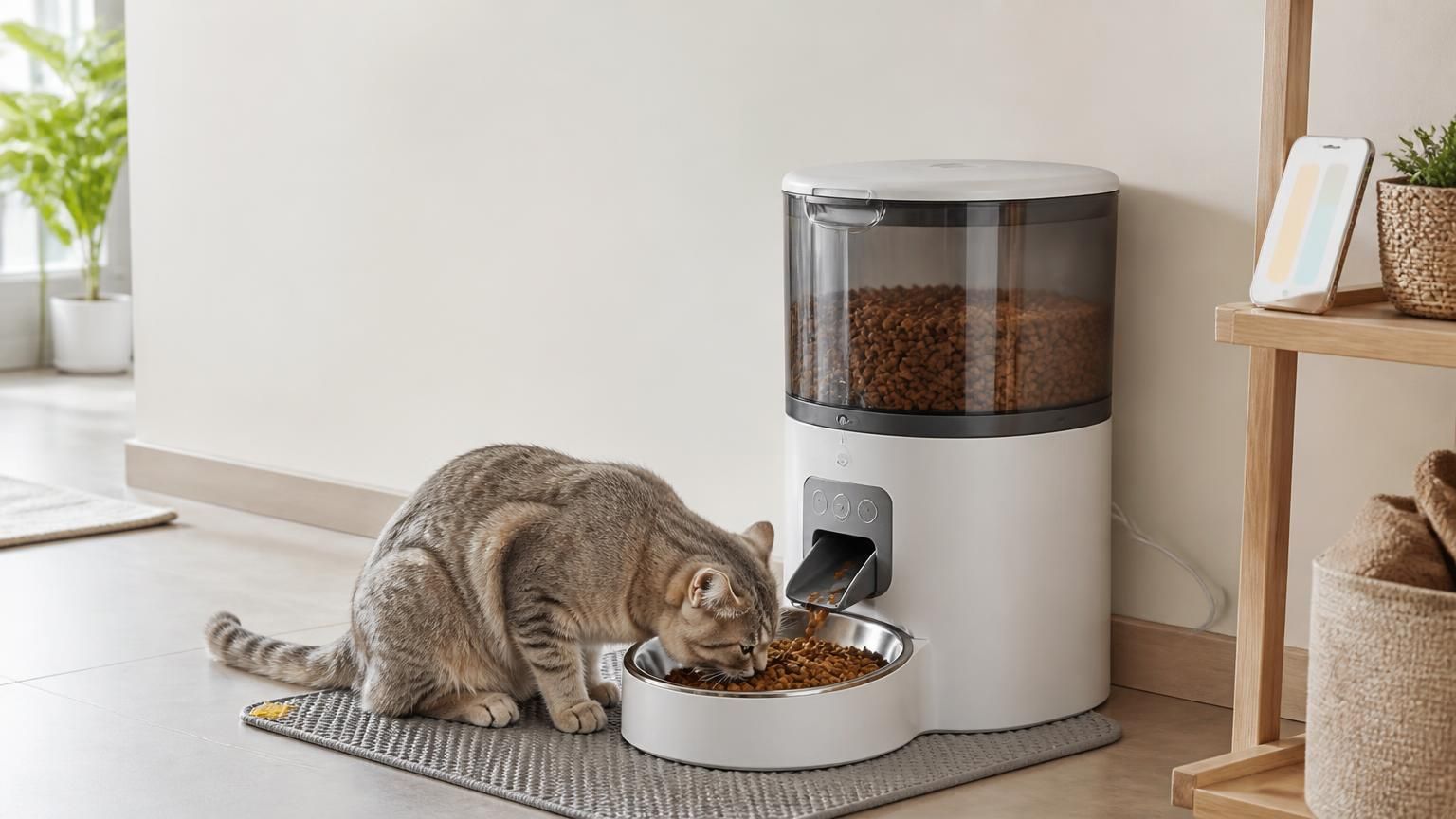
A feeder's portion setting may be expressed in grams, cups, units or motor rotations. These are not necessarily equal across brands. Kibble density and shape affect the mass dispensed by a given volume.
If portion accuracy matters, weigh several test servings using the actual food you intend to use. Compare the average with the prescribed amount and check whether the output varies between cycles. Repeat the test at different hopper levels, because some mechanisms behave differently when nearly full or nearly empty.
| Portion specification | What to check | Why it matters |
|---|
| Smallest portion step | Grams, cups or dispensing units | Determines adjustment granularity |
| Maximum portion | Maximum per scheduled event | Must cover the required meal |
| Number of portions per day | Schedule limit | Supports the feeding routine |
| Repeatability | Variation across several dispenses | Affects consistency |
| Food compatibility | Kibble dimensions and shape | Helps prevent jams and bridging |
| Calibration method | Whether the user can adjust or test output | Helps match the food's density |
Do not rely on the app's portion number without testing. If a pet needs a carefully measured ration, use a kitchen scale to verify output and confirm the feeding plan with the veterinarian. Do not change the pet's daily food quantity merely because the feeder offers larger or smaller steps.
5. Meal scheduling and clock reliability
Check how many meals can be scheduled each day, whether each meal can have a different portion and whether the schedule is retained after a power cut. Some models allow a one-time manual feed from a button or app. Others include a slow-feed or repeated-dispense option.
A reliable clock matters. Check whether the feeder synchronises time through the app, whether it handles daylight-saving changes where relevant and whether the schedule continues without Wi-Fi. If the device resets after an outage, the owner may need to configure it again.
For a multi-person household, confirm whether several authorised users can view the schedule and whether changes are logged. Avoid accidental duplicate schedules created by different family members.
6. Power supply and battery backup
Some feeders operate from a mains adapter, some use batteries and some support both. Dual-power models may continue dispensing from backup batteries when the mains supply fails, but the behaviour varies.
Ask:
- Are batteries included?
- What type and number are required?
- Can the feeder run entirely on batteries?
- Does battery backup preserve the schedule?
- Does the device send a low-battery alert?
- Does the motor operate normally in backup mode?
- What happens when power returns?
A backup battery may keep the clock and scheduled dispensing running, while app connectivity and notifications stop. Confirm the exact behaviour in the manual. Do not assume that the feeder will send an alert during a power or Wi-Fi outage.
Route power cables away from chewing, water bowls and walking paths. Use the supplied adapter and keep the powered base dry.
7. Wi-Fi, app control and offline operation
Smart feeders may connect to a phone app through Wi-Fi. They can allow remote scheduling, manual dispensing, low-food notifications, jam alerts or feeding history. Some are limited to 2.4 GHz Wi-Fi, so check router compatibility before buying.
A basic timed feeder should ideally retain its schedule locally, even if the internet or router is unavailable. Check whether the feeder can dispense meals offline and whether the app is required for initial setup only or for everyday operation.
Review:
- Supported Wi-Fi bands.
- App compatibility with Android and iOS.
- Multiple-user access.
- Feeding history and alert details.
- Firmware update process.
- Account and cloud requirements.
- Whether schedules remain stored locally.
- What features stop when a subscription ends.
Do not pay extra for remote camera features if you only need scheduled dispensing. Keep account credentials secure and review the app's privacy permissions.
8. Camera and two-way audio features
Some premium feeders include a camera, microphone or speaker. A camera can help an owner observe whether the pet approaches the bowl, while two-way audio may allow a brief voice interaction. These features do not prove that the correct amount was eaten or that the pet is healthy.
Check camera resolution, viewing angle, night mode, local versus cloud storage, subscription requirements and notification behaviour. A wide-angle camera may show the feeding area but distort distance. Two-way audio can startle some animals, so test it gently.
Consider privacy if the feeder is placed in a shared living area. Review whether video is stored in the cloud, who can access it and whether the camera can be disabled physically or in software.
9. Food outlet and jam resistance
The outlet is a common failure point. Kibble can bridge above the opening, lodge in the chute or jam the dispensing wheel. A feeder that works with one small, round kibble may not work with a larger triangular or irregular food.
Check the maximum and minimum kibble dimensions if published. Test the actual food before relying on the device. Look for an outlet that can be inspected and cleaned without dismantling the motor assembly.
A jam alert is useful, but not every feeder can detect every blockage. Some only monitor motor movement or current. Confirm how the alert is triggered and what the owner should do when it appears.
Avoid forcing food through the chute or inserting tools while the device is powered. Follow the manual and unplug the feeder before clearing a blockage.
10. Lid security and pet-proof design
Some pets learn to open lids, push feeders across the floor or reach into the food outlet. A secure locking lid, stable base and protected dispensing mechanism can reduce tampering.
Check:
- Lid latch and seal.
- Hopper attachment.
- Base weight and footprint.
- Non-slip feet.
- Bowl retention.
- Access to the food outlet.
- Cable protection.
- Whether the unit can be anchored or positioned safely.
If the pet is strong or persistent, test the feeder while supervised. A lightweight plastic unit may be easy to tip. Do not assume that a lid described as “pet-proof” will withstand every animal.
11. Multi-pet households and food stealing
A standard feeder dispenses food into an accessible bowl. It does not know which animal is eating. In a multi-pet home, one pet may consume another's ration, particularly if one needs a special diet.
Possible approaches include:
- Separate feeding locations.
- Individual timed feeders.
- Microchip-activated feeders for compatible animals.
- Supervised feeding.
- Physical barriers where safe.
Microchip feeders can restrict access to an enrolled animal, but compatibility with the pet's identification chip and the feeder's opening mechanism must be checked. A microchip feeder is not the same as a simple timed hopper.
If one animal requires prescription food or a strict portion, consult the veterinarian about a feeding setup that prevents food sharing. Do not rely on a dual-bowl feeder to separate two animals' diets.
12. Wet food: freshness, temperature and hygiene
Wet food spoils more readily than dry kibble. A feeder with timed compartments may be suitable for short periods if it is designed for that food and the manufacturer's storage guidance is followed. Some products include cooling packs or powered refrigeration; others simply expose the food at a scheduled time.
Check:
- Whether wet food is explicitly supported.
- Whether the compartment is sealed.
- Cooling method and duration.
- Whether the tray can be removed and washed.
- How long food may remain at room temperature.
- Whether the unit alerts the owner to a problem.
Do not leave wet food in a non-refrigerated feeder for extended periods in a warm room. Follow food safety guidance and the pet-food manufacturer's instructions. Remove uneaten food and clean the tray promptly.
13. Bowl material and cleaning
Food-contact surfaces should be easy to clean and resistant to wear. Stainless-steel bowls are often convenient because they can be removed and washed, but check the grade and cleaning instructions. Plastic bowls may be lighter but can scratch over time.
Look for:
- Removable bowl and tray.
- Dishwasher-safe status where claimed.
- Smooth corners and minimal crevices.
- Access to the chute and dispensing wheel.
- Hopper removal without spilling food.
- Clear instructions for cleaning the motor base.
Do not immerse the powered base or wash electrical parts unless the manufacturer explicitly says they are waterproof. Switch off and disconnect the feeder before cleaning. Let removable parts dry completely before reassembly.
14. Desiccant and food freshness
Some hoppers include a desiccant compartment to help manage moisture. Check whether the desiccant is food-safe for the intended use, replaceable and kept separate from the kibble. A desiccant does not make an unsealed hopper airtight or preserve food indefinitely.
In humid Indian climates, moisture can affect kibble texture and freshness. Store the main food supply according to the manufacturer's instructions and refill the feeder with a sensible quantity. Clean the hopper periodically rather than continually topping up old food.
If the feeder is exposed to direct sunlight or a hot kitchen, food quality may deteriorate faster. Place it in a cool, dry location away from steam, cooking splashes and direct heat.
15. Portion testing before regular use
Before relying on a new feeder, run it under supervision for several days. Use the pet's normal food, test each scheduled meal and observe whether the animal accepts the bowl and sound of the motor.
A practical test routine:
1. Assemble the feeder and read the manual.
2. Measure the intended portion using the pet's normal food.
3. Run several manual dispensing cycles.
4. Weigh the output to estimate variation.
5. Test the full schedule while at home.
6. Simulate a Wi-Fi interruption if the manual permits.
7. Test battery backup as instructed.
8. Confirm the pet can access the bowl comfortably.
9. Check for jams, tipping or food stealing.
10. Continue human checks after deployment.
Do not leave the pet relying on an untested feeder while travelling. A short supervised trial can reveal a jam, poor portion size or fear of the motor noise before it becomes a missed meal.
16. Reliability, alerts and failure planning
An automatic feeder can fail in several ways: power loss, battery depletion, Wi-Fi outage, jammed food, empty hopper, stuck lid, tipped unit or a pet refusing to eat. Consider how each failure will be detected and who can respond.
A useful alert system may report:
- Low food level.
- Low battery.
- Missed or failed dispense.
- Jam or motor error.
- Offline status.
- Lid or hopper status, where supported.
However, alerts may depend on internet access and app notifications. A feeder cannot confirm that the pet ate the food unless it has a specific sensor—and even that sensor may only detect bowl weight or movement.
Keep a backup feeding plan and arrange a person to check the animal when you are away. Do not treat the feeder as a substitute for pet sitting or veterinary care.
17. Warranty, spare parts and app support
Check the warranty for the motor, electronics, power adapter, battery compartment and camera module. Bowls, seals and desiccants may be consumables. Confirm whether replacement trays, lids and dispensing parts are sold separately in India.
For app-controlled devices, review the manufacturer's support record and update policy. Ask whether basic scheduled dispensing continues if the company stops supporting the app or cloud service. Keep the manual and setup details in a secure place.
18. Common buying mistakes
Choosing only by hopper capacity: A large container does not guarantee accurate portions or reliable dispensing.
Assuming every kibble works: Shape and size can cause bridging or jams.
Trusting portion units without weighing: A volume-based portion may not equal the required grams.
Ignoring backup power: A mains-only feeder can stop during an outage.
Assuming Wi-Fi is essential for scheduling: Prefer a model that retains schedules offline where possible.
Using dry-food hoppers for wet food: Wet food needs a compatible tray and suitable freshness controls.
Ignoring multi-pet food stealing: A standard feeder cannot identify which pet eats.
Skipping the supervised trial: A new device may jam or frighten the pet.
Leaving the animal unattended for too long: Remote alerts do not replace human checks.
19. Questions to ask before paying
- Is the feeder designed for dry kibble, wet food or both?
- What kibble dimensions are supported?
- What is the usable hopper capacity?
- How is a portion measured and adjusted?
- Can I weigh and calibrate a serving?
- How many meals can be scheduled each day?
- Does the schedule work without Wi-Fi?
- What happens during a power cut?
- Are backup batteries supported and included?
- Does the device detect jams or low food?
- Can the bowl and hopper be removed for cleaning?
- Is the bowl stainless steel or plastic?
- Are app, camera or cloud subscriptions required?
- Can multiple pets be fed separately?
- What warranty and spare parts are available in India?
Purchase checklist
- [ ] Confirm the pet's food type and daily ration with the feeding plan.
- [ ] Choose hopper or compartment design.
- [ ] Check kibble size and outlet compatibility.
- [ ] Verify portion increments and weigh test servings.
- [ ] Confirm meal schedule and offline memory.
- [ ] Review battery backup and outage behaviour.
- [ ] Check Wi-Fi, app and subscription requirements.
- [ ] Inspect lid, base stability and cable routing.
- [ ] Plan separate feeding for pets with different diets.
- [ ] Confirm bowl, tray and hopper cleaning instructions.
- [ ] Run a supervised trial before relying on the feeder.
- [ ] Arrange human checks and a backup feeding plan.
Frequently asked questions
Can an automatic feeder dispense wet food?
Only if the exact model is designed for wet food. Compartment feeders may support timed wet-food portions, but check cooling, room-temperature limits, cleaning and food-removal instructions.
Are automatic pet feeders accurate?
Accuracy varies by mechanism, food shape and portion setting. Test several portions with the actual kibble and weigh them if precise feeding matters.
Does a smart feeder work without Wi-Fi?
Some retain their schedules locally and continue dispensing offline; others depend more heavily on app connectivity. Confirm the exact model's behaviour during an internet outage.
Is battery backup necessary?
It is useful where power interruptions occur. Check whether batteries can run the feeder or only preserve the clock, and whether the schedule continues during backup mode.
Can one feeder serve two pets?
A dual-bowl model may dispense to two bowls, but it cannot necessarily prevent one pet from eating both portions. Separate diets may require separate feeding areas or a compatible access-controlled feeder.
Can I leave my pet alone with an automatic feeder?
A feeder does not replace human care. Arrange suitable checks, fresh water, safe surroundings and a person who can respond if the device fails or the pet becomes unwell.
How often should I clean the feeder?
Follow the manual and food type. Bowls and wet-food trays need frequent cleaning; hoppers and chutes should be emptied and cleaned periodically to remove crumbs and oily residue.
Final verdict
Choose an automatic pet feeder by matching the dispensing mechanism, food compatibility, portion accuracy and backup behaviour to the pet's actual feeding plan. Test the portion with the food you use, confirm that schedules work during network interruptions and make cleaning straightforward. A camera or app is secondary to a reliable motor, secure lid and accessible bowl. Run a supervised trial and maintain a human backup plan—an automatic feeder can support routine, but it cannot replace observation and care.