Some manufacturers use proprietary diagnostic procedures or require security authorisation. Newer vehicles may include a security gateway that restricts certain operations. Ask the scanner seller to confirm support for your intended task before paying.
4. OBD, OBD-II, EOBD and manufacturer-specific diagnostics
OBD-II is a standardised diagnostic framework used in many markets. EOBD is the European implementation. Other regional regulations and vehicle architectures may use related standards. The availability and scope of standardised functions depend on vehicle type, market and applicable regulations.
A common misconception is that every vehicle with a 16-pin diagnostic connector supports every OBD-II function. The connector shape alone does not establish protocol support or full-system coverage. Older vehicles may use manufacturer-specific systems, while newer vehicles may combine standard diagnostic services with proprietary modules and security controls.
For Indian buyers, confirm the vehicle's actual diagnostic support rather than relying on a global compatibility list that may refer to a different engine or market. If the vehicle is older or imported, a dealer or specialist workshop may be able to identify the correct protocol and connector.
5. Diagnostic connector and cable quality
Many passenger vehicles use a 16-pin diagnostic connector, commonly called the DLC. Its location varies: it may be under the dashboard, near the steering column, behind a cover or in another manufacturer-specified location.
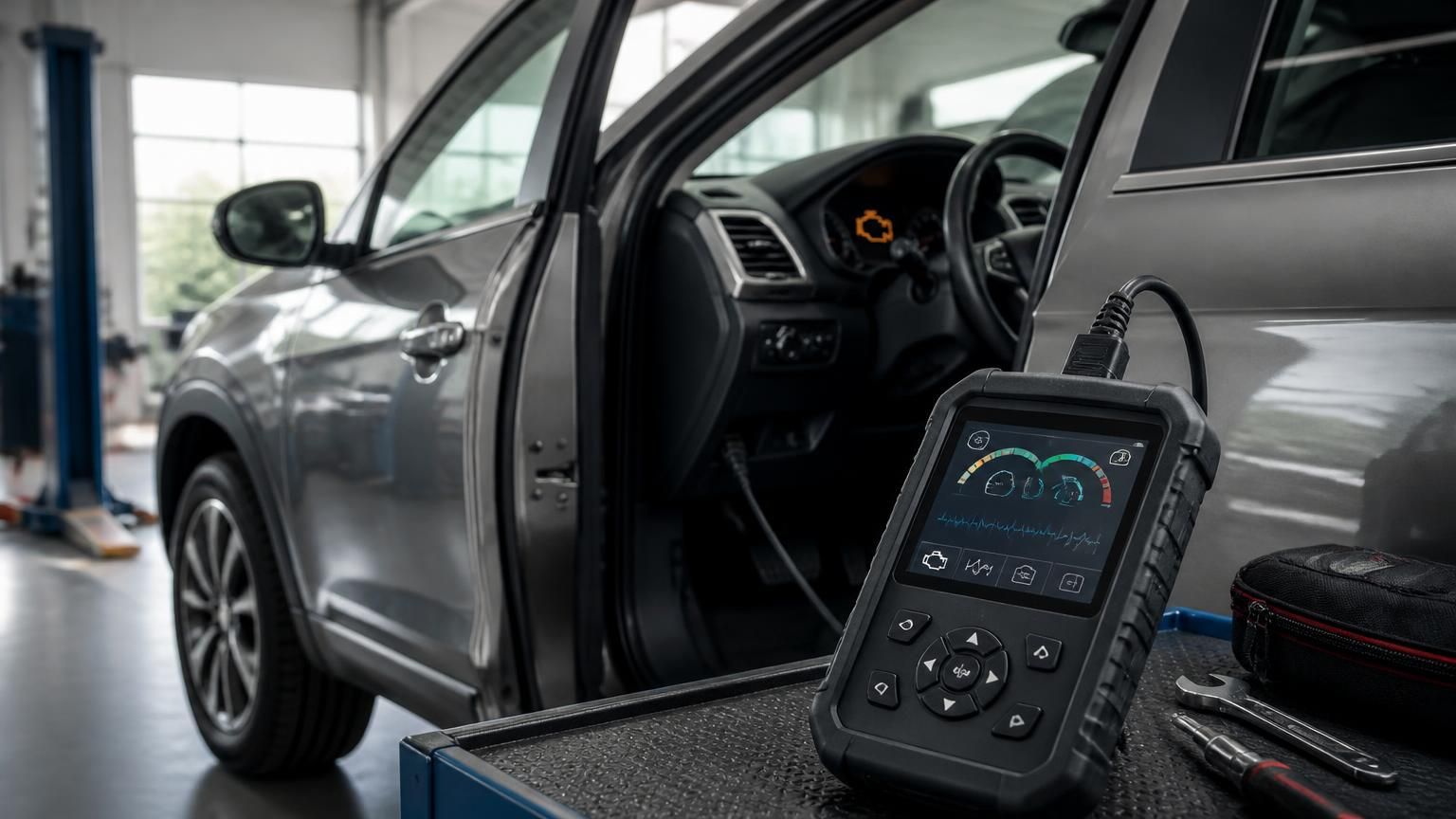
Check that the scanner's plug is correctly moulded and seats firmly without excessive force. A loose connector can interrupt communication. For a wired handheld scanner, cable strain relief and flexibility matter. For a Bluetooth adapter, check that its body does not obstruct pedals, steering movement or trim panels when installed.
Avoid leaving a diagnostic adapter plugged in permanently unless the manufacturer and vehicle guidance allow it. Some adapters draw standby current or remain accessible over Bluetooth. Remove it after use, especially if the vehicle will be parked for long periods.
Never force a connector or bridge pins with improvised wires. The diagnostic port is an electrical interface, not a general-purpose power socket.
6. Read, pending, permanent and stored codes
A scanner may display several code states. Understanding them prevents misinterpretation.
| Code state | General meaning | Buying consideration |
|---|
| Stored or confirmed | A fault met the vehicle's criteria for recording | Check code status and description |
| Pending | A fault has been detected but may not yet meet confirmation criteria | Useful for intermittent or developing issues |
| Permanent | A qualifying emissions-related fault record that may remain until the vehicle's monitoring system confirms the issue is resolved | Cannot necessarily be erased with a basic clear command |
| History | A past event retained by some manufacturer-specific systems | Availability depends on vehicle and tool |
Code wording varies by scanner database. A generic description may be incomplete or inaccurate for a manufacturer-specific code. Prefer tools that show the raw code, status, module and vehicle-specific description where supported.
Do not assume that a code's first letter identifies the exact component to replace. For example, a sensor circuit code may result from wiring, connector, power supply, ground, exhaust leak or control-module issues. Use the manufacturer's diagnostic flowchart and verify the circuit before replacing parts.
7. Live data and data graphing
Live data displays values reported by the vehicle's control module while the engine or system is operating. Depending on the vehicle, this may include engine speed, coolant temperature, intake air temperature, fuel trims, throttle position, oxygen-sensor readings, vehicle speed and other parameters.
A useful scanner should present values clearly and allow the user to select relevant parameters. Graphing can help identify trends or compare signals over time. However, the scanner only displays the data available through the vehicle's diagnostic interface. It is not the same as a calibrated external measurement instrument or oscilloscope.
Check:
- Number of parameters displayed simultaneously.
- Refresh rate and responsiveness.
- Ability to graph multiple data streams.
- Unit selection and conversion.
- Data recording and playback.
- Export options.
- Whether manufacturer-specific parameters are supported.
A slow refresh rate can make rapidly changing data difficult to interpret. A long list of parameters is not necessarily useful if the display is cluttered or the values are poorly labelled.
8. Freeze-frame data and readiness monitors
Freeze-frame data stores selected operating conditions associated with certain faults. It can provide context such as engine load, speed or temperature at the time the fault was recorded, where the vehicle supports it.
Readiness monitors indicate whether selected emissions-related self-tests have completed. They are often relevant after repairs or when a vehicle's diagnostic memory has been cleared. A scanner that displays readiness status can help the owner or technician understand whether the vehicle's monitors have run.
Do not clear codes immediately before an inspection or sale simply to hide a warning. Clearing diagnostic memory may reset readiness information and remove useful evidence. A buyer inspecting a used vehicle should consider whether monitors are complete and whether there are signs of recent clearing, but this alone does not prove fraud or a hidden fault.
9. ABS, airbag and transmission coverage
ABS, SRS/airbag, transmission and body modules are not guaranteed by a generic engine-code reader. These systems may require enhanced or manufacturer-specific diagnostic access.
If you need to investigate an ABS warning, confirm that the tool supports the ABS module for your exact vehicle. If you need airbag diagnostics, verify SRS coverage and use appropriate workshop precautions. Airbag systems contain safety-critical components; do not probe connectors or wiring without the manufacturer's procedure.
A scanner may display a module's stored code but not support every live-data item or service function. Ask for a module-by-module coverage list, not a vague statement that the tool supports “all systems”.
For a home user, a basic engine reader may be enough. For a multi-brand workshop, full-system access can be valuable, but coverage must be checked for each vehicle and model year.
10. Service resets and special functions
Some diagnostic tools advertise oil-service reset, electronic parking brake service, battery registration, steering-angle calibration, throttle adaptation, DPF functions, injector coding or other maintenance procedures.
These are not generic functions that work on every vehicle. They depend on the model, control module, software version and sometimes a specific repair condition. A scanner may support a function for one variant but not another.
Before buying, write down the exact service operation you need. Ask the seller to confirm that operation on the precise make, model, year and engine. Do not rely on a global count such as “30 reset functions” or “all maintenance services”.
Some functions change vehicle settings or command components. Follow the service manual and use qualified technicians for safety-critical procedures.
11. Bidirectional active tests
A bidirectional scanner can send supported commands to a vehicle module and request an actuator or function to operate. This is different from simply reading a code or displaying live data.
Examples may include commanding a cooling fan, operating a solenoid or testing a supported actuator. Availability varies by vehicle and module. Active tests can be useful for isolating whether a problem lies in a component, wiring or control circuit, but they require technical understanding and safe test conditions.
Check:
- Which modules support active tests.
- Which specific actuators can be commanded.
- Whether the function is supported on your vehicle.
- Whether the tool provides safety prompts.
- Whether a subscription or security authorisation is required.
Do not activate components near moving parts, hot surfaces or people without the manufacturer's procedure. A bidirectional feature is not a substitute for safe workshop practice.
12. Coding, adaptation and programming are different
Product listings sometimes use coding, adaptation, calibration and programming as if they mean the same thing. They do not.
- Coding/configuration changes supported settings or configuration values in a module.
- Adaptation/relearn runs a procedure so a system can learn or recalibrate selected values.
- Calibration establishes or verifies a reference for a system or sensor.
- Programming/reflashing writes software or calibration data to a control module.
A scanner that offers a few coding options is not automatically capable of programming every ECU. Programming may require manufacturer software, a compatible interface, authorised access, stable power supply and a specific procedure.
If you are buying for module replacement or ECU programming, confirm the exact workflow and supported vehicle list. Do not assume that a J2534 pass-through interface includes OEM software access or that it can perform every programming job independently.
13. Bluetooth, Wi-Fi, USB or wired connection
The connection method affects convenience, reliability and setup.
| Connection | Advantages | Points to check |
|---|
| Wired handheld | Simple, no phone pairing | Cable reach, screen and connector durability |
| Bluetooth adapter | Compact and convenient with a phone | App compatibility, pairing and background permissions |
| Wi-Fi adapter | Can connect to supported phone apps | Phone network switching and app configuration |
| USB interface | Useful with a laptop and supported software | Driver, operating-system and software compatibility |
| Dedicated tablet | Integrated screen and workshop workflow | Updates, battery, storage and subscription costs |
Bluetooth adapters vary widely in hardware quality and firmware. Some generic adapters use limited command sets or unreliable clones. A low price can be attractive, but poor communication may produce missing data, connection drops or unsupported commands.
Use the app recommended by the adapter maker and check recent app updates, privacy policy and compatibility with your phone. Do not grant unnecessary permissions or leave a diagnostic interface exposed to unknown devices.
14. App quality, software updates and subscriptions
The software is a major part of the scanner. Check the supported phone or tablet operating systems, language, code database, data display, report export and update policy.
Some professional tools include a period of free software updates and then charge an annual renewal. Others provide basic updates without a subscription but charge for advanced manufacturer coverage. Clarify which functions continue to work after the update period expires.
Ask:
- Is the app free or paid?
- Is there a one-time licence or annual subscription?
- What is included in the first year?
- Can basic code reading continue if the subscription expires?
- Are vehicle coverage updates included?
- Is cloud storage required for reports?
- Can the scanner be used offline?
- How long is the product supported?
Do not purchase a tool based only on the number of vehicle makes shown in a promotional graphic. Ask for the latest coverage list and the exact update terms.
15. Battery, power and workshop use
A handheld scanner may be powered by the vehicle diagnostic port, an internal rechargeable battery or both. A tablet-based tool may have its own battery and charging dock. Check runtime, charging time, screen brightness and whether the tool can remain powered during longer diagnostic sessions.
For workshop use, a stable external power supply may be required during certain programming or coding operations. Follow the vehicle manufacturer's instructions. A low-voltage event during module programming can interrupt the process and cause serious problems.
Do not connect an ordinary phone charger or improvised supply to diagnostic pins. Use only the specified charger and cable. Inspect the tool's casing, battery and charging port for damage.
16. Reports, logs and used-car inspection
Some scanners can save fault reports, data logs or vehicle information. This can help document an intermittent issue or share findings with a mechanic. Check whether reports include the vehicle identification number, module name, code status, timestamp and live-data context where supported.
For used-car inspections, a scanner is one part of the evaluation. It can reveal stored codes and selected monitor status, but it cannot prove that the engine, transmission, airbags, chassis or bodywork are sound. A seller may have cleared codes, and some faults may not be present during a short scan.
Combine a diagnostic scan with a physical inspection, road test, service history and professional evaluation. Never treat “no codes found” as a complete certificate of vehicle health.
17. Safety and responsible use
Follow the vehicle and scanner manuals. Keep cables clear of pedals and moving components. Avoid connecting or disconnecting equipment while driving. If a live-data test requires the engine to run, secure the vehicle in a suitable ventilated location and follow the workshop procedure.
Do not probe airbag wiring, high-voltage hybrid/EV components or unfamiliar connectors. Generic OBD2 tools are not designed to make high-voltage systems safe. Hybrid and electric vehicles may have a low-voltage diagnostic interface and separate high-voltage components; only trained personnel should work on the latter.
If a warning relates to brakes, steering, airbags, overheating, oil pressure or another safety-critical system, stop using the vehicle when the owner's manual advises and obtain qualified help. Reading a code is not a reason to continue driving an unsafe vehicle.
18. Common buying mistakes
Assuming OBD2 means full-system access: Standard engine diagnostics and manufacturer-specific modules are different capabilities.
Buying without checking the exact model year: Protocol and module support can vary by variant.
Believing a code identifies a failed part: It reports a detected condition, not necessarily the root cause.
Choosing by code database size: A large database is useless if the scanner cannot access the required module.
Ignoring app and update costs: A cheap adapter can become expensive if essential functions require subscriptions.
Assuming all Bluetooth adapters are equal: Firmware, chipset and app compatibility affect reliability.
Expecting service resets on every car: Functions are vehicle-specific.
Clearing codes before recording them: This can remove useful diagnostic context and reset readiness monitors.
Treating a clean scan as a full used-car inspection: Mechanical and physical checks remain essential.
19. Questions to ask before paying
- Does it support my exact make, model, year and engine sold in India?
- Is the tool for generic engine codes or full-system diagnostics?
- Can it access ABS, SRS, transmission and body modules on my vehicle?
- Does it show stored, pending and permanent code status?
- Does it display freeze-frame and readiness monitors?
- Can it graph and record live data?
- Are service resets or active tests available for my exact model?
- Is bidirectional control supported, and for which modules?
- Does it require an app, subscription or annual update?
- What functions remain available after the subscription expires?
- Is the device compatible with my phone or laptop?
- What warranty and local support are provided?
Purchase checklist
- [ ] Identify the exact diagnostic job before selecting a tool.
- [ ] Record vehicle make, model, year, engine and market variant.
- [ ] Confirm generic OBD2 compatibility for that vehicle.
- [ ] Verify each additional module separately.
- [ ] Check live data, freeze-frame and readiness support.
- [ ] Confirm exact service functions and active tests.
- [ ] Distinguish coding, adaptation and programming.
- [ ] Review app, software update and subscription terms.
- [ ] Check connector, cable and device build quality.
- [ ] Confirm warranty, support and vehicle coverage updates.
- [ ] Keep original codes and reports before clearing anything.
- [ ] Use a qualified technician for safety-critical systems.
Frequently asked questions
Will an OBD2 scanner work on every car in India?
No. Compatibility depends on the vehicle's diagnostic standard, model year, engine, market version and control modules. A 16-pin connector does not guarantee full OBD2 or manufacturer-specific access.
Can a basic OBD2 scanner read ABS and airbag codes?
Usually not. Basic readers focus on standardised powertrain diagnostics. ABS and SRS access requires enhanced support for the exact vehicle.
Does a fault code tell me which part to replace?
Not necessarily. A code identifies a detected condition. Wiring, connectors, power supply, mechanical issues or another component can cause the same code. Follow a diagnostic procedure before replacing parts.
Can I clear the check-engine light with a scanner?
Many scanners can request supported code clearing, but clearing a code does not repair the fault. It may also reset readiness monitors and remove useful information. Record the code and investigate the cause first.
What is freeze-frame data?
It is a snapshot of selected operating conditions associated with a recorded fault, where the vehicle supports it. It can help a technician understand the conditions under which the fault occurred.
Do I need a bidirectional scanner?
Only if your work requires supported actuator commands or active tests. Basic code reading and live data do not require bidirectional control.
Are Bluetooth OBD2 adapters safe to leave plugged in?
Do not assume so. Some draw standby power or remain accessible wirelessly. Follow the adapter and vehicle guidance, and remove it after use unless permanent installation is specifically supported.
Can an OBD2 scanner diagnose a hybrid or electric vehicle?
It may access selected low-voltage vehicle modules if supported, but it is not a high-voltage service tool. Never work on traction-battery circuits without the manufacturer's procedures and appropriate training.
Final verdict
Choose an OBD2 scanner by starting with the vehicle and the diagnostic task—not the headline number of supported makes or functions. A basic reader can be sufficient for generic engine codes, while ABS/SRS access, service resets and bidirectional tests require explicit vehicle-specific support. Check the app, update costs, connector quality and warranty, and remember that a code is a diagnostic clue rather than a parts-replacement instruction. Preserve the original scan and use qualified help for safety-critical systems.